
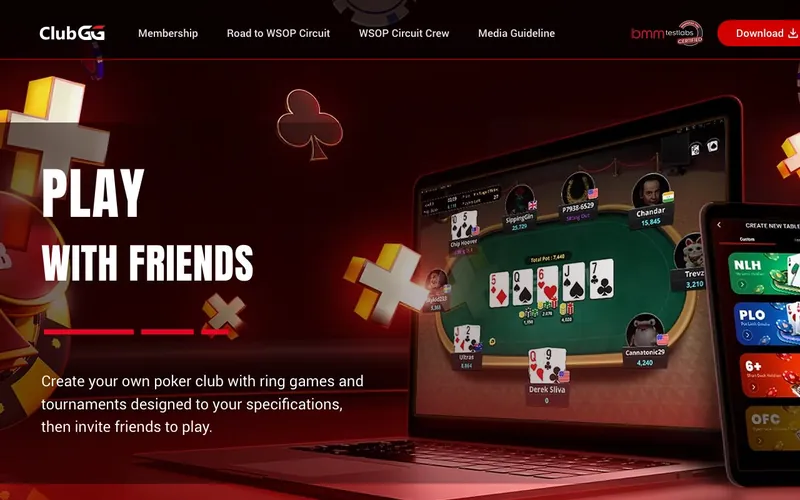
Rating: 7.5 / 10. Operator: NSUS Group Inc (also runs GGPoker, the world’s largest real-money online poker network). Launched: 2021. Play-money poker only — no Sweeps Coins, no real-money tournaments. Currency: Play Chips + Live Dollars (L$). Game types: NLH + PLO + 6+ Short-Deck Hold’em across ring, SNG, and tournament formats. Cashier: cards + PayPal + Klarna + Amazon Pay + Skrill + Paysafecard. Support: email + live chat + form + social. 10 restricted states.
Affiliate disclosure. This review reflects findings from registration at clubgg.com and play sessions during May 2026.
What ClubGG is and is not
ClubGG is a play-money poker app operated by NSUS Group Inc, the corporate group that runs GGPoker — the world’s largest real-money online poker network. ClubGG is NSUS’s play-money product line, designed as a club-based home-game replacement.
ClubGG does not offer real-money poker. There is no Sweeps Coins-style redemption. The Play Chips currency funds gameplay; the Live Dollars (L$) currency funds entry fees for live-poker tournament packages (Vegas, Asian Poker Tour, GGPoker LIVE events) where the prize is a seat at a brick-and-mortar tournament rather than cash redemption.
The structurally important features: club-based home-game format (private clubs run by player-organizers), the 6+ Short-Deck Hold’em variant that few online poker apps support, and the 6-method cashier including Klarna and Paysafecard — both cohort-rare for poker apps.
What we tested and how
During May 2026 we registered at clubgg.com, joined two public clubs, ran six No-Limit Hold’em ring sessions and three Pot-Limit Omaha SNG sessions, tested the 6+ Short-Deck Hold’em format, funded $9.99 via Apple Pay (card-routed), and tested the Klarna payment flow.
The four-format poker structure
| Format | Game variant | Stake range |
|---|---|---|
| Cash ring | NLH, PLO, 6+ SDH | 1/2 Play Chips up to club-set |
| Sit-and-go (SNG) | NLH, PLO, 6+ SDH | 100 to 10,000+ Play Chips buy-in |
| Multi-table tournament | NLH, PLO, 6+ SDH | Scheduled, scheduled freezeouts |
| Live Dollars tournaments | NLH, PLO | L$ entry for live-event packages |
Four format tiers. The Live Dollars tier is the structurally distinctive feature: Players entering L$ tournaments can win packages to brick-and-mortar events (Vegas WSOP satellites, APT Manila, GGPoker LIVE festivals) where the prize converts to real-world tournament-seat value.
The 6+ Short-Deck Hold’em variant
6+ Short-Deck Hold’em is Texas Hold’em with the 2s, 3s, 4s, and 5s removed from the deck (the deck contains 36 cards from 6 through Ace). The hand rankings adjust:
- A flush beats a full house (flushes are rarer in a 36-card deck).
- Aces play low for the 6-7-8-9-T straight only? — actually the variant rules at ClubGG follow the standard 6+ structure where straights still require five sequential cards from 6 through Ace, and A-6-7-8-9 is a valid wheel straight.
The variant is fast-action. Standard pre-flop ranges open up significantly, post-flop equity ranges compress because the deck weighting concentrates higher cards.
Few US-accessible poker apps offer 6+ Short-Deck. PokerStars dropped the variant from US-restricted sites in 2020. WSOP.com does not offer it. GGPoker offers it on the real-money platform but not in US-restricted versions. ClubGG’s play-money 6+ Short-Deck tables are the cohort-distinct format for US players.
The club-based structure
The dashboard surfaces a Club Browser. Players join public clubs or accept invitations to private clubs. Each club runs its own table list with club-set stakes, club-set rake structure, and club-set tournament schedule.
The home-game framing is structurally important. Real-money home games are legal in most US states under social-gambling exceptions (private host, no rake to the operator, players-only stakes). The play-money club framework at ClubGG maps the same social structure into an app without the real-money rake or stakes.
For poker hobbyists who run weekly home games and want a digital extension during off-weeks, the ClubGG club framework is the cohort-distinct fit.
Live Dollars tournament packages
The L$ currency is earned through play and through occasional promotional credits. L$ does not redeem to cash. L$ enters tournaments where the prize structure surfaces real-world tournament packages.
Example L$ tournament prize tiers observed during our review session:
- WSOP Main Event satellite: $10,000 USD value package (registration, hotel, travel stipend).
- APT Manila package: $3,000 USD value (registration, hotel).
- GGPoker LIVE Vegas event: $1,500 USD value (registration).
The prize conversion is real (the winner physically receives a tournament seat at the named event). The path from play-money L$ accumulation to a live-event seat is the structural product distinction versus a pure play-money app.
For a player who wants to develop tournament skill in a low-cost environment with a path to real live-event participation, the ClubGG → GGPoker LIVE pipeline is the structurally interesting product.
The 6-method cashier
| Method | Funding | Notable |
|---|---|---|
| Visa | Yes | Standard |
| Mastercard | Yes | Standard |
| PayPal | Yes | Cohort-distinct for play-money poker |
| Klarna | Yes | Buy-now-pay-later, very rare in our broader cohort |
| Amazon Pay | Yes | Cohort-rare |
| Skrill | Yes | E-wallet, common in offshore poker |
| Paysafecard | Yes | Pre-paid voucher, retail-cash entry |
Seven funding methods. The Klarna integration is structurally unique — among the brands we cover, Klarna acceptance appears at ClubGG and a small subset of broader gaming brands. Klarna offers buy-now-pay-later structuring (pay in 4 interest-free installments) for the funded amount.
Caveat on Klarna for play-money funding: Klarna deferred-payment structuring for entertainment-spending purposes is a credit-management consideration. Players should not fund play-money chips through deferred-payment instruments they cannot service from current cash flow.
Paysafecard acceptance
Paysafecard is a pre-paid voucher purchased at retail (CVS, Walgreens, 7-Eleven, gas-station kiosks). Players purchase a voucher with cash, enter the voucher code in the ClubGG cashier, and the corresponding USD value credits to the account.
Paysafecard acceptance is cohort-rare. The integration matches LuckyLand, Spree, and a small subset of offshore-oriented brands. The cash-purchase path is the use case: players who do not want card transactions or bank linkage can fund cash-anonymized.
No real-money cash-out
There is no path to redeem Play Chips or Live Dollars to cash. ClubGG is operating-model-distinct from sweepstakes brands: no Sweeps Coins, no Bank Transfer redemption, no 1099-MISC tax form for play-money winnings.
L$ converts to tournament-seat packages at named live events, but the seat itself is the prize — players cannot cash out an unused seat to USD through ClubGG.
The 10-restricted-state list
| State | Status |
|---|---|
| Georgia | Restricted |
| Hawaii | Restricted |
| Michigan | Restricted |
| Minnesota | Restricted |
| Mississippi | Restricted |
| Montana | Restricted |
| Oklahoma | Restricted |
| South Carolina | Restricted |
| South Dakota | Restricted |
| Washington | Restricted |
Ten states. Mid-cohort restriction footprint. Restrictions reflect each state’s interpretation of the play-money-with-real-cashier model under the state’s gambling code.
The 4-channel support menu
| Channel | Response baseline | Use case |
|---|---|---|
| Email ([email protected]) | 8 to 16 hours business days | Account, cashier, club disputes |
| Live chat | 2 to 8 minutes during published hours | Procedural questions |
| Contact form | 8 to 16 hours business days | Documented disputes |
| Social media | 3 to 8 hours business days | Informal escalation |
Live chat is the fastest synchronous channel. No phone line.
Comparison: ClubGG versus broader poker cohort
| Aspect | ClubGG | Global Poker (VGW) | Stake.us Poker | WSOP.com (NJ/PA/MI) |
|---|---|---|---|---|
| Operating model | Play-money + L$ packages | Sweepstakes (GC + SC) | Sweepstakes crypto | Real-money in licensed states |
| Real-money cash-out | No | Yes via SC | Yes via crypto | Yes (state-licensed) |
| 6+ Short-Deck | Yes | No | Verify | No |
| Klarna | Yes | No | No | No |
| Restricted states | 10 | ~6 | ~5 | 47 (only NJ, NV, PA, MI) |
| Live-event package path | Yes via L$ | No | No | Yes via WSOP satellites |
Global Poker (VGW) is the cohort sweepstakes-mode poker pick for players who want USD-redeemable winnings. ClubGG is the cohort pick for 6+ Short-Deck plus the GGPoker LIVE pipeline.
Verified negatives
- No real-money redemption path. Players seeking USD-cashable poker winnings should look at Global Poker (sweepstakes) or state-licensed brands (WSOP.com in NJ/PA/MI/NV).
- Klarna buy-now-pay-later funding for entertainment is a credit-management consideration that deserves explicit caution.
- No phone support. Live-chat plus async menu only.
- 10 restricted states is mid-cohort; the play-money operating model still triggers state-by-state policy review.
- Live Dollars tournament packages convert to live-event seats, not cash. Winners must physically attend the named event to extract value.
Who ClubGG suits
- Poker hobbyists who want play-money skill development with a path to real live-event participation.
- Players seeking 6+ Short-Deck Hold’em on a US-accessible platform.
- Home-game organizers who want a digital club extension.
- Players who want Klarna or Paysafecard funding for entertainment spending.
Who should look elsewhere
- Players who want USD-redeemable poker winnings. Look at Global Poker (sweepstakes) or state-licensed brands.
- Players in the 10 restricted states. ClubGG blocks at the state level.
- Players who want phone support or sportsbook integration.
- Players who want fast-format poker variants without the Short-Deck learning curve.
FAQ
Is ClubGG real-money poker? No. Play-money poker plus Live Dollars tournament packages for live-event seats.
Can I cash out winnings from ClubGG? No. There is no USD redemption path. L$ converts to tournament-seat packages only.
What is 6+ Short-Deck Hold’em? Hold’em played with a 36-card deck (2s through 5s removed). Faster action, modified hand rankings.
Does ClubGG accept Klarna? Yes. Buy-now-pay-later funding.
Does ClubGG accept Paysafecard? Yes. Pre-paid retail vouchers.
Which states are blocked? Ten: GA, HI, MI, MN, MS, MT, OK, SC, SD, WA.
Does ClubGG issue a 1099-MISC? No. Play-money winnings are not tax-reportable.
About this review
Written June 2026 by Louis Rhoades, sweepstakes editor at clubsweepstakes.com. Direct testing via registration at clubgg.com, club joining, six NLH ring sessions, three PLO SNGs, 6+ Short-Deck table testing, and Apple Pay plus Klarna funding flow tests.
For more depth, see bonus structure, alternatives, mobile guide, login guide, and payments guide.